How to Evaluate an Online Learning Platform
Online learning platforms make it possible to study new subjects, develop professional skills and complete training from almost anywhere.
Some platforms offer individual short courses, while others provide certificates, qualifications, subscription libraries or complete learning programmes. The quality, depth and usefulness of these services can vary considerably.
A polished website, large course catalogue or low monthly price does not automatically mean that a platform is suitable for your needs.
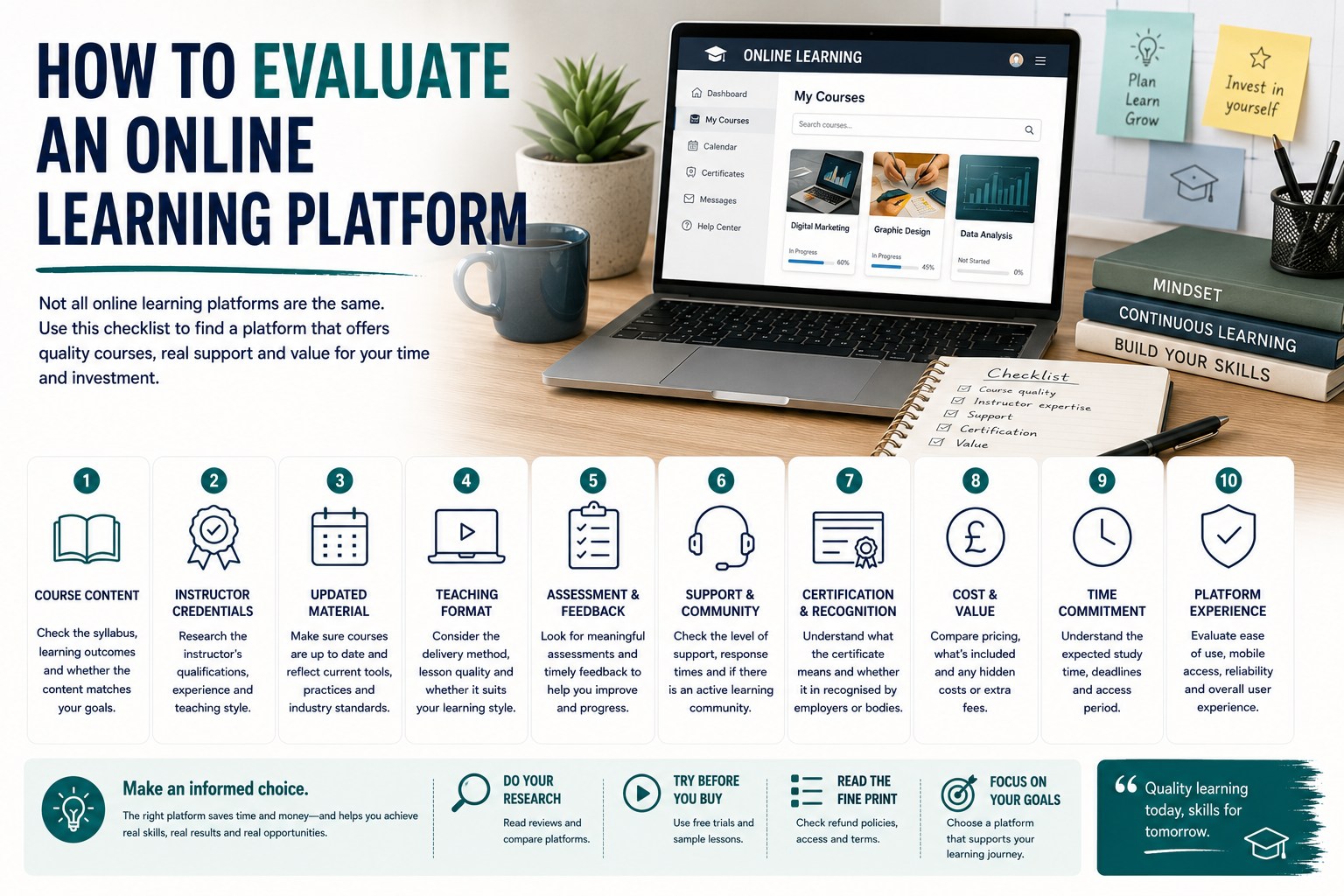
Before registering or paying, it is worth checking the quality of the courses, the experience of the instructors, the level of support and whether the learning outcomes match your goals.
Start With Your Learning Goal
Before comparing platforms, define what you want to achieve.
Your goal may be to:
- Explore a new subject
- Improve a practical skill
- Prepare for a career change
- Gain a recognised qualification
- Support professional development
- Learn software
- Prepare for an exam
- Build a portfolio
- Meet an employer requirement
This matters because different platforms serve different purposes.
A large library of short videos may be suitable for general learning but insufficient when you need formal assessment, tutor feedback or a recognised qualification.
A specialist training provider may offer fewer courses but provide greater depth in one subject.
Check the Course Content
A useful course page should explain what is included.
Look for:
- Module titles
- Learning outcomes
- Lesson length
- Practical activities
- Assessments
- Required knowledge
- Downloadable materials
- Projects
- Final outcomes
Avoid choosing a course based only on its title.
A course called “Complete Digital Marketing” may provide only a broad overview, while another may include practical work across analytics, advertising, content and search optimisation.
Ask whether the course covers the specific skills you need.
Review the Course Level
Platforms sometimes label courses as beginner, intermediate or advanced without clearly explaining what those levels mean.
Check:
- What prior knowledge is expected
- Which tools you should already understand
- Whether technical experience is required
- How quickly the course progresses
- Whether foundational material is included
A beginner course should not assume extensive previous knowledge.
An advanced course should offer more than information that can be found in a basic introduction.
Sample lessons can help you judge the level more accurately.
Research the Instructor
The quality of the instructor can strongly influence the usefulness of a course.
Look for information about:
- Qualifications
- Teaching experience
- Industry experience
- Current professional work
- Published material
- Professional memberships
- Previous courses
- Student feedback
A strong practitioner may not always be a strong teacher, while an experienced educator may be able to explain complex topics more clearly.
Ideally, the instructor should have both relevant knowledge and the ability to communicate it effectively.
Be cautious where no instructor is named or where the biography contains only vague claims.
Look for Recent and Updated Material
Online courses can become outdated, particularly in subjects involving:
- Technology
- Software
- Marketing
- Law
- Finance
- Regulation
- Professional standards
- Social media
Check:
- When the course was created
- When it was last updated
- Whether screenshots reflect current software
- Whether links still work
- Whether regulations are current
- Whether the provider publishes update notes
An older course may still be valuable for stable subjects, but rapidly changing fields require regular maintenance.
Examine the Teaching Format
Online learning can include:
- Recorded video lessons
- Live classes
- Written modules
- Audio lessons
- Interactive exercises
- Practical assignments
- Group discussions
- Tutor feedback
- Webinars
- Projects
Different learners prefer different formats.
Video may work well for demonstrations, while written material may be better for detailed reference.
A good platform often combines several formats rather than relying entirely on passive video.
Consider whether you will be expected to:
- Watch
- Read
- Practise
- Submit work
- Participate
- Complete tests
Active learning is often more useful than simply watching lessons.
Check Video and Audio Quality
Poor production can make an otherwise useful course difficult to follow.
Look for:
- Clear sound
- Readable screens
- Appropriate pacing
- Captions
- Good editing
- Logical chapters
- Useful demonstrations
High production quality does not guarantee strong teaching, but technical problems can interfere with learning.
Sample lessons are helpful for assessing:
- Voice clarity
- Teaching style
- Presentation speed
- Screen visibility
- Lesson structure
Review Accessibility Features
Online learning should be accessible to as many people as possible.
Useful features may include:
- Captions
- Transcripts
- Keyboard navigation
- Adjustable playback speed
- Screen-reader compatibility
- High-contrast design
- Downloadable text
- Flexible deadlines
- Alternative formats
Students with specific accessibility requirements should ask the provider what support is available before enrolling.
Automatic captions may contain errors, particularly with technical terminology.
Understand the Assessment Process
Some platforms offer informal quizzes, while others provide detailed assignments and tutor-reviewed projects.
Check:
- How progress is assessed
- Whether assignments are marked
- Whether feedback is provided
- Whether tests are timed
- Whether exams are supervised
- Whether resits are allowed
- What is required to pass
A certificate based only on watching videos may carry less value than one requiring practical assessment.
The assessment should reflect the skill being taught.
For example, a design course should ideally involve creating and reviewing actual work.
Check Whether Feedback Is Available
Feedback can help learners understand mistakes and improve.
It may be provided by:
- The instructor
- Qualified tutors
- Peer reviewers
- Automated systems
- Community members
Each approach has limitations.
Automated feedback can be useful for simple quizzes but may not provide meaningful guidance on complex or creative work.
Peer feedback can encourage discussion, but its quality may vary.
For professional or specialist training, direct tutor feedback may be especially valuable.
Evaluate the Learning Community
Some platforms include:
- Discussion boards
- Private groups
- Live sessions
- Study groups
- Peer feedback
- Networking events
- Alumni communities
A supportive community can improve motivation and help learners ask questions.
However, check whether the community is:
- Active
- Moderated
- Relevant
- Respectful
- Supported by tutors
A large forum with little meaningful participation may add limited value.
Look at the Course Structure
A well-designed course should follow a logical sequence.
Lessons should build on one another rather than feel like unrelated videos placed together.
A clear structure may include:
- Introduction
- Foundations
- Core concepts
- Practical application
- Advanced topics
- Assessment
- Final project
The platform should make it easy to see:
- What has been completed
- What comes next
- Which deadlines apply
- Where resources are stored
- How progress is measured
Check the Time Commitment
Self-paced does not mean effortless.
Review:
- Total lesson hours
- Recommended study time
- Assignment time
- Project requirements
- Course-access period
- Deadlines
- Live-session dates
A course containing ten hours of video may require much more time when exercises, reading and projects are included.
Make sure the schedule is realistic alongside work and personal responsibilities.
Compare Certification Carefully
Many platforms offer certificates, but their value varies.
A certificate may confirm:
- Course completion
- Assessment
- Continuing professional development
- A regulated qualification
- Credit toward further study
Ask:
- Who issues the certificate?
- Is it independently recognised?
- Does it require assessment?
- Is it accepted by employers?
- Does it expire?
- Is certification included in the price?
The existence of a certificate does not automatically make a course professionally recognised.
For regulated careers, confirm requirements with the appropriate authority.
Review Career Claims
Some platforms promote:
- Job-ready skills
- Guaranteed interviews
- High salaries
- Rapid career changes
- Employer recognition
These claims should be examined carefully.
Ask whether the provider publishes:
- Graduate outcomes
- Completion rates
- Employment figures
- Employer partnerships
- Independent verification
- Clear methodology
Avoid assuming that completing one online course will automatically lead to employment.
Career outcomes depend on experience, location, market demand, qualifications and the quality of the learner’s work.
Consider Portfolio Opportunities
For creative, technical or practical subjects, a portfolio may be more useful than a completion certificate.
Check whether the course includes:
- Practical projects
- Case studies
- Assignments
- Feedback
- Final portfolio pieces
- Realistic briefs
- Opportunities to improve work
A course should help learners demonstrate what they can do, not simply what they watched.
Check the Platform Experience
The learning platform itself should be easy to use.
Consider:
- Navigation
- Video playback
- Progress tracking
- Mobile access
- Search
- Downloads
- Notifications
- Note-taking
- Technical reliability
A confusing system can make learning unnecessarily frustrating.
Look for reviews mentioning:
- Login problems
- Lost progress
- Video errors
- App reliability
- Browser compatibility
- Customer support
Review Mobile Access
Some learners need to study using a phone or tablet.
Check whether the platform offers:
- A mobile-responsive website
- A dedicated app
- Offline downloads
- Synced progress
- Mobile quizzes
- Readable course materials
A course may technically work on mobile while still being impractical for detailed assignments or software demonstrations.
Consider which tasks will require a laptop or desktop computer.
Understand Access Periods
Some platforms provide lifetime access, while others limit access to a subscription period or fixed number of months.
Check:
- How long course access lasts
- Whether access continues after completion
- Whether downloads remain available
- Whether updates are included
- Whether certificates remain accessible
- What happens when a subscription ends
“Lifetime access” may refer to the lifetime of the platform or course rather than the learner’s lifetime.
Read the terms carefully.
Compare Pricing Models
Online learning platforms may charge through:
- One-off course fees
- Monthly subscriptions
- Annual subscriptions
- Programme fees
- Instalments
- Membership plans
Each model can be useful depending on how much you plan to study.
A subscription may provide good value if you complete several courses.
A one-off payment may be better when you need only one specialist programme.
Check for additional costs such as:
- Certificates
- Exams
- Tutor support
- Downloads
- Premium projects
- Software
- Materials
- Membership renewal
Calculate the realistic total cost rather than relying on the headline price.
Review Free Trials Carefully
Free trials can help assess the platform, but they may renew automatically.
Before starting, check:
- Trial length
- Payment details required
- Renewal price
- Cancellation method
- Which courses are included
- Whether progress is retained
- Whether certificates are excluded
Set a reminder if automatic renewal applies.
Understand Refund Terms
Review the refund policy before paying.
Check:
- Refund period
- Eligibility conditions
- Usage limits
- Administrative fees
- Subscription cancellation
- Course-transfer options
- Exceptions
Some providers may refuse refunds once a certain amount of content has been accessed.
Keep copies of the advertised terms and confirmation emails.
Research Independent Reviews
Reviews can provide useful information about:
- Course quality
- Tutor support
- Billing
- Refunds
- Platform reliability
- Certification
- Customer service
- Difficulty
Look for patterns across several sources.
Be cautious with:
- Reviews that contain no detail
- Repeated promotional wording
- Affiliate reviews that focus only on positives
- Ratings that apply to the platform but not the specific course
A platform can host both excellent and poor courses, so course-level reviews are particularly useful.
Check Data Privacy
Online platforms may collect:
- Personal details
- Payment information
- Learning activity
- Assessment results
- Discussion posts
- Uploaded projects
Review:
- The privacy policy
- Data-sharing practices
- Marketing preferences
- Account deletion
- Security measures
- How uploaded work may be used
Avoid uploading confidential workplace or client information to assignments unless you have permission.
Check Ownership of Uploaded Work
Creative or professional courses may ask learners to upload:
- Designs
- Writing
- Code
- Photography
- Business ideas
- Portfolios
Read the terms to understand:
- Who owns the work
- Whether the platform can reuse it
- Whether it may be displayed publicly
- Whether other users can download it
- How to remove it
Learners should retain appropriate rights to their original work.
Look for Clear Support Options
Technical or administrative support should be easy to access.
Check whether support is available by:
- Live chat
- Telephone
- Help centre
- Community forum
- Tutor messaging
Also check expected response times.
A platform offering thousands of courses may provide limited individual support.
Warning Signs
Potential warning signs include:
- Guaranteed employment
- Unclear instructor information
- False countdown timers
- Permanent “limited-time” discounts
- Vague course content
- Hidden subscription renewals
- No refund terms
- Outdated lessons
- Copied material
- No contact information
- Certificates presented as qualifications without explanation
Several warning signs should encourage caution.
Create a Comparison Checklist
Compare platforms using factors such as:
| Factor | Platform A | Platform B | Platform C |
|---|---|---|---|
| Course relevance | |||
| Instructor experience | |||
| Course level | |||
| Last updated | |||
| Teaching format | |||
| Assessment | |||
| Tutor feedback | |||
| Accessibility | |||
| Certificate value | |||
| Access period | |||
| Total price | |||
| Refund policy |
This makes it easier to compare practical value rather than promotional claims.
Use Sample Content Before Committing
Where possible, review:
- A sample lesson
- The syllabus
- A sample assignment
- The instructor’s teaching style
- Student projects
- The platform interface
This can reveal more than a promotional page.
Final Thoughts
Evaluating an online learning platform requires more than checking the course catalogue or monthly price.
The most important factors include course quality, instructor expertise, current material, assessment, support, accessibility and realistic outcomes.
A good platform should make it clear what you will learn, how you will be taught and what the course can genuinely help you achieve.
Take time to compare options, review independent feedback and check the terms before paying.
The best platform is not necessarily the one with the most courses. It is the one that provides relevant, well-structured learning in a format you can use successfully.