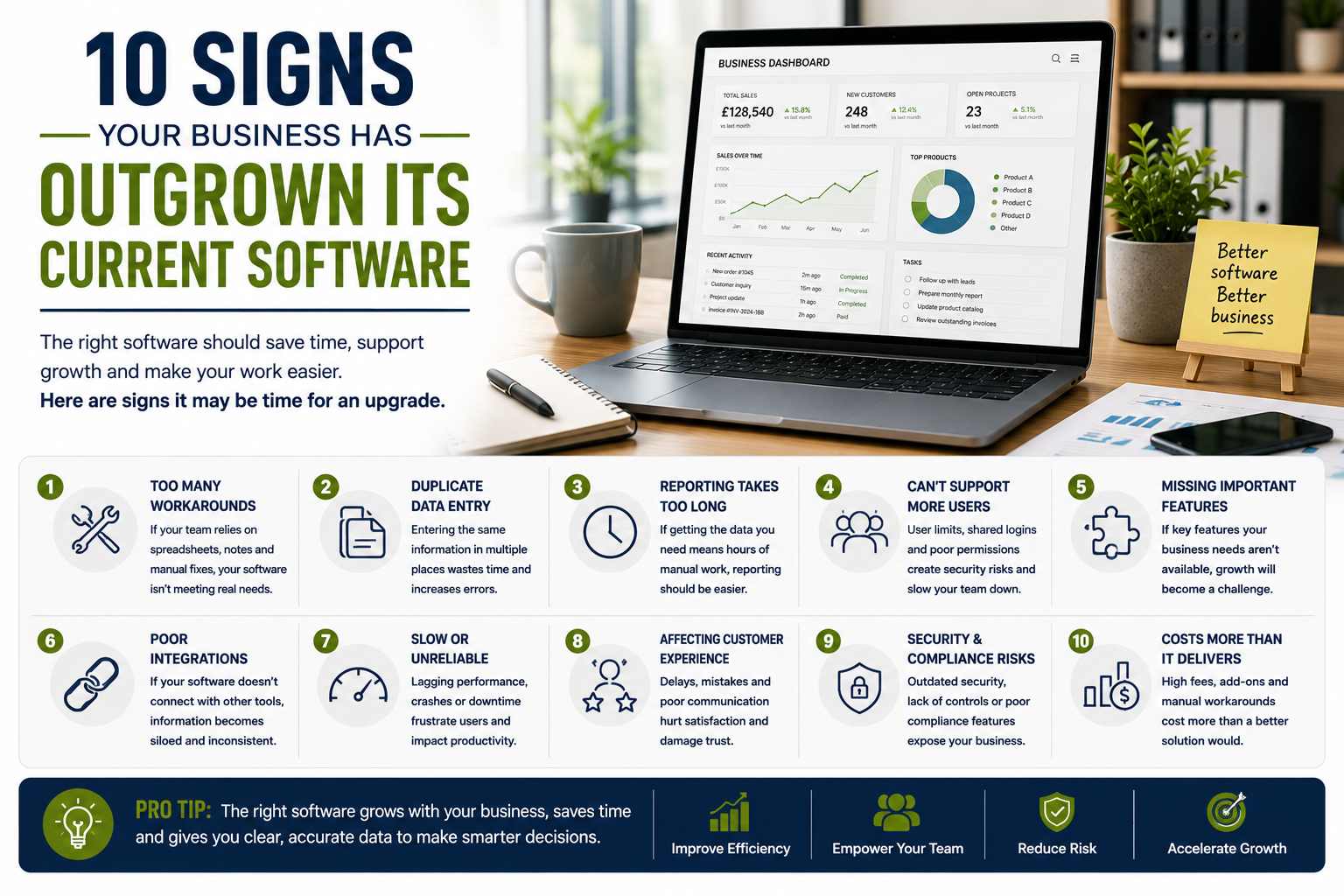
10 Signs Your Business Has Outgrown Its Current Software
Business software often begins as a practical solution to a specific problem.
A small team may start with a spreadsheet, a basic accounting package, a simple booking tool or an entry-level customer management system. For a time, the system may work well.
As the business grows, however, the same software can begin to create delays, duplicate work and reporting problems. Staff may spend more time working around the system than benefiting from it.
Replacing software unnecessarily can be expensive and disruptive, but continuing with an unsuitable platform can also limit growth.
Here are ten signs that a business may have outgrown its current software.
1. Staff Rely on Workarounds
One of the clearest warning signs is the number of manual workarounds surrounding the software.
These may include:
- Separate spreadsheets
- Personal notes
- Repeated data entry
- Additional email chains
- Unofficial shared documents
- Manual calculations
- Duplicate customer lists
- Separate task trackers
A workaround may solve an immediate problem, but several workarounds usually indicate that the software no longer supports the real process.
For example, a customer relationship management platform may be intended to store all sales information. If the team also maintains a spreadsheet because the system cannot show the required data clearly, the software may no longer be fit for purpose.
Businesses should ask:
- Why is the workaround necessary?
- Which feature is missing?
- How much time does it consume?
- What risks does it create?
- Could configuration solve the issue?
Not every workaround requires new software, but repeated manual processes should be reviewed.
2. The Same Information Is Entered More Than Once
Duplicate data entry wastes time and increases the risk of inconsistency.
A team may enter the same customer information into:
- A website form
- A spreadsheet
- A CRM
- Accounting software
- A project-management platform
- An email marketing tool
This can lead to:
- Different addresses in different systems
- Outdated contact details
- Duplicate customer records
- Reporting errors
- Missed updates
- Extra administration
Modern software should reduce unnecessary repetition through suitable integrations or shared records.
If the business continues entering the same information into several systems, it may need either better integration or a more suitable central platform.
3. Reporting Takes Too Long
Business reporting should support decisions.
If reports require hours of manual work, the software may no longer provide the information the business needs.
Common problems include:
- Data exported into spreadsheets
- Figures copied from several tools
- Conflicting totals
- Manual chart creation
- Limited filtering
- No historical comparisons
- No custom reports
- Delayed information
A growing business may need to monitor:
- Revenue
- Sales pipeline
- Enquiries
- Project performance
- Staff capacity
- Customer retention
- Marketing performance
- Outstanding payments
The software should make important information easier to understand.
If every report becomes a separate data project, the system may be creating more work than it saves.
4. The Software Cannot Support More Users
Entry-level plans may work well for one or two people but become restrictive as the team expands.
Problems may include:
- User limits
- Expensive additional seats
- Shared logins
- Weak permission controls
- No role-based access
- No guest access
- Limited collaboration
Shared accounts can create security and accountability problems.
The business may not know:
- Who changed a record
- Who deleted a file
- Who approved an action
- Which employee viewed sensitive data
Each user should ideally have appropriate individual access.
If the platform cannot support this economically or securely, it may be time to review alternatives.
5. Important Features Are Missing
Business needs change over time.
A system that once provided everything required may lack newer priorities such as:
- Automation
- Advanced reporting
- Mobile access
- Online payments
- Customer portals
- Electronic signatures
- Multi-location support
- Inventory
- Recurring billing
- Workflow approvals
The business should distinguish between genuinely necessary features and attractive extras.
A feature is more likely to be essential when its absence causes:
- Repeated manual work
- Delays
- Errors
- Lost enquiries
- Poor customer experience
- Compliance risks
Before replacing the platform, check whether the feature is available through:
- A higher plan
- An integration
- An extension
- Better configuration
- Custom development
The cost and complexity of these options should be compared with moving to another system.
6. The Platform Does Not Integrate With New Tools
As a business grows, it often adds specialist systems.
These may include:
- Accounting software
- Customer relationship management
- Email marketing
- Booking systems
- Ecommerce
- Cloud storage
- Project management
- Payment tools
- Analytics
- Automation software
If the existing platform cannot connect with these tools, information may become fragmented.
Integration problems may lead to:
- Manual imports
- Delayed updates
- Duplicate records
- Inconsistent customer information
- Broken workflows
A growing software setup should function as a connected system rather than a collection of isolated tools.
The business should consider whether future integrations are likely to be required before committing to an upgrade or replacement.
7. Performance Becomes Slow or Unreliable
Software may perform well with a small amount of data but struggle as usage increases.
Warning signs include:
- Slow searches
- Pages timing out
- Failed uploads
- Delayed syncing
- App crashes
- Reports not loading
- Frequent outages
- Lost work
Performance problems can affect customers as well as staff.
For example, an unreliable booking system may cause:
- Duplicate appointments
- Failed payments
- Missing confirmations
- Customer complaints
Before replacing the software, investigate whether the problem is caused by:
- Internet connectivity
- Devices
- Browser issues
- Poor configuration
- Storage limits
- Service outages
If the underlying platform cannot handle current usage reliably, the business may have outgrown it.
8. Customer Experience Is Being Affected
Software should support a smooth customer journey.
Problems may appear as:
- Slow response times
- Repeated requests for information
- Incorrect invoices
- Missed appointments
- Poor order updates
- Complicated booking
- Delayed quotations
- Inconsistent communication
Customers may not know that software is causing the issue.
They simply experience the business as disorganised.
A useful review should map the customer journey from first enquiry to completion.
Identify where the current system creates:
- Waiting
- Confusion
- Repetition
- Errors
- Unnecessary steps
Improving software can sometimes improve customer service without requiring additional staff.
9. Security and Compliance Requirements Have Increased
A simple platform may have been acceptable when the business stored limited information.
As the company grows, it may hold more:
- Customer data
- Employee records
- Financial information
- Contracts
- Health information
- Payment details
- Confidential files
The existing system may no longer provide appropriate:
- User permissions
- Audit logs
- Multi-factor authentication
- Encryption
- Backup controls
- Data-retention options
- Regional hosting
- Compliance documentation
Security should be reviewed before a problem occurs.
A platform that cannot meet current legal, contractual or industry requirements may need to be replaced even if it remains convenient to use.
10. The Software Costs More Than the Value It Provides
The price of software often increases gradually.
Costs may include:
- Monthly subscriptions
- Additional users
- Premium integrations
- Storage
- Support
- Transaction fees
- Automation limits
- Training
- Customisation
A platform may still be affordable in isolation but expensive when the business also pays for several tools to compensate for its limitations.
Review the total cost of the current system, including:
- Subscription fees
- Staff administration time
- Duplicate tools
- Manual reporting
- Errors
- Missed opportunities
- External support
A more expensive replacement may offer better value if it removes several other costs.
Calculate the Cost of Keeping the Current System
Businesses often focus on the cost of switching but overlook the cost of staying.
The current system may consume money through:
- Repeated data entry
- Staff frustration
- Slow reporting
- Missed follow-ups
- Manual invoicing
- Customer-service problems
- Duplicate subscriptions
Estimate how many hours are spent each month on workarounds.
Multiply this by the approximate staff cost.
This can provide a more realistic basis for comparison.
Check Whether Better Configuration Could Solve the Problem
Replacing software should not be the automatic response.
Some issues can be solved through:
- Cleaning old data
- Changing permissions
- Creating templates
- Improving integrations
- Adding automations
- Training staff
- Updating workflows
- Moving to another plan
Many businesses use only a small proportion of the features already available.
Before migrating, ask the provider or an experienced consultant whether the existing platform can be improved.
Ask the People Who Use the Software
Decision-makers may not see the everyday problems experienced by staff.
Speak with users from different roles.
Ask:
- Which tasks take too long?
- What information is difficult to find?
- Which steps are repeated?
- What causes errors?
- Which features are missing?
- What works well?
- What should not be lost?
This feedback can reveal whether the main problem is the software, the process or the training.
Define Future Requirements
A replacement should support realistic future needs, not only current frustrations.
Consider the next two to three years.
The business may expect:
- More users
- More locations
- Higher transaction volumes
- Additional services
- International customers
- New reporting needs
- More automation
- Larger files
- Stronger security requirements
Avoid paying for extreme scalability that is unlikely to be needed.
The aim is to select a system that can support reasonable growth without becoming unnecessarily complicated.
Compare Total Cost Rather Than Monthly Price
A software comparison should include:
- Subscription
- Implementation
- Migration
- Training
- Integrations
- Support
- Storage
- Additional users
- Contract terms
- Future upgrades
A platform with a lower monthly price may require costly customisation.
A more expensive option may include onboarding, support and essential features.
Compare the likely cost over at least one full year.
Plan Data Migration Carefully
Moving business data can be one of the most difficult parts of changing software.
Before committing, ask:
- What can be exported?
- Which formats are supported?
- Will attachments transfer?
- How will duplicate records be handled?
- Who will clean the data?
- How long will migration take?
- Can the old system remain accessible?
- How will accuracy be checked?
Poor migration can transfer old problems into the new platform.
Data should be reviewed and cleaned before import where possible.
Test Real Workflows
A demonstration may show the software under ideal conditions.
Use a trial or test environment to recreate normal work.
For example:
- Add a customer
- Create a quotation
- Assign a task
- Generate an invoice
- Run a report
- Export data
- Add a user
- Change permissions
Ask staff to test the same processes.
This can reveal usability problems before the business commits.
Avoid Replacing Too Many Systems at Once
Changing several important platforms simultaneously can create unnecessary disruption.
A phased approach may be safer.
For example:
- Replace the CRM
- Test integrations
- Train staff
- Stabilise the process
- Replace the next system
The appropriate approach depends on how closely the tools are connected.
Keep Important Accounts Under Business Control
The business should control:
- Administrator accounts
- Billing
- Recovery emails
- Integrations
- Data exports
- Security settings
Accounts should use company-controlled email addresses rather than personal accounts belonging to employees or external suppliers.
This makes future transitions easier.
Create a Transition Plan
A software transition plan may include:
- Responsibilities
- Timeline
- Data migration
- Testing
- Training
- Internal communication
- Customer communication
- Backup procedures
- Launch
- Review
There may need to be a period when both systems operate in parallel.
This should be kept as short as practical to reduce duplicate work.
Train Staff Properly
Even excellent software can fail when users do not understand it.
Training should cover:
- Core tasks
- Permissions
- Data standards
- Security
- Reporting
- Common errors
- Support process
Written guides and short videos can help staff after the initial training.
The business should also explain why the change is being made.
People are more likely to adopt a new system when they understand the benefit.
Review the New System After Launch
A software change should be reviewed after implementation.
Consider:
- Is it solving the original problem?
- Are staff using it consistently?
- Are workarounds disappearing?
- Are reports easier?
- Has customer experience improved?
- Are integrations reliable?
- Are additional changes required?
A review after one month and again after three months can identify issues while they are still manageable.
Warning Signs When Choosing a Replacement
Be cautious of platforms with:
- Unclear pricing
- Limited exports
- Aggressive sales pressure
- Weak security information
- Poor support reviews
- Long contracts
- Hidden user charges
- Difficult cancellation
- Unreliable performance
The replacement should reduce risk rather than create a new form of dependence.
Final Thoughts
A business may have outgrown its software when manual workarounds, duplicate data, slow reporting and missing integrations become part of everyday work.
The decision to replace a platform should be based on clear operational problems rather than frustration alone.
Before switching, review whether configuration, training or a higher plan could solve the issue.
Where replacement is justified, define requirements carefully, test real workflows and plan migration in detail.
The right software should reduce administration, support better decisions and make it easier for the business to grow without losing control of its information.