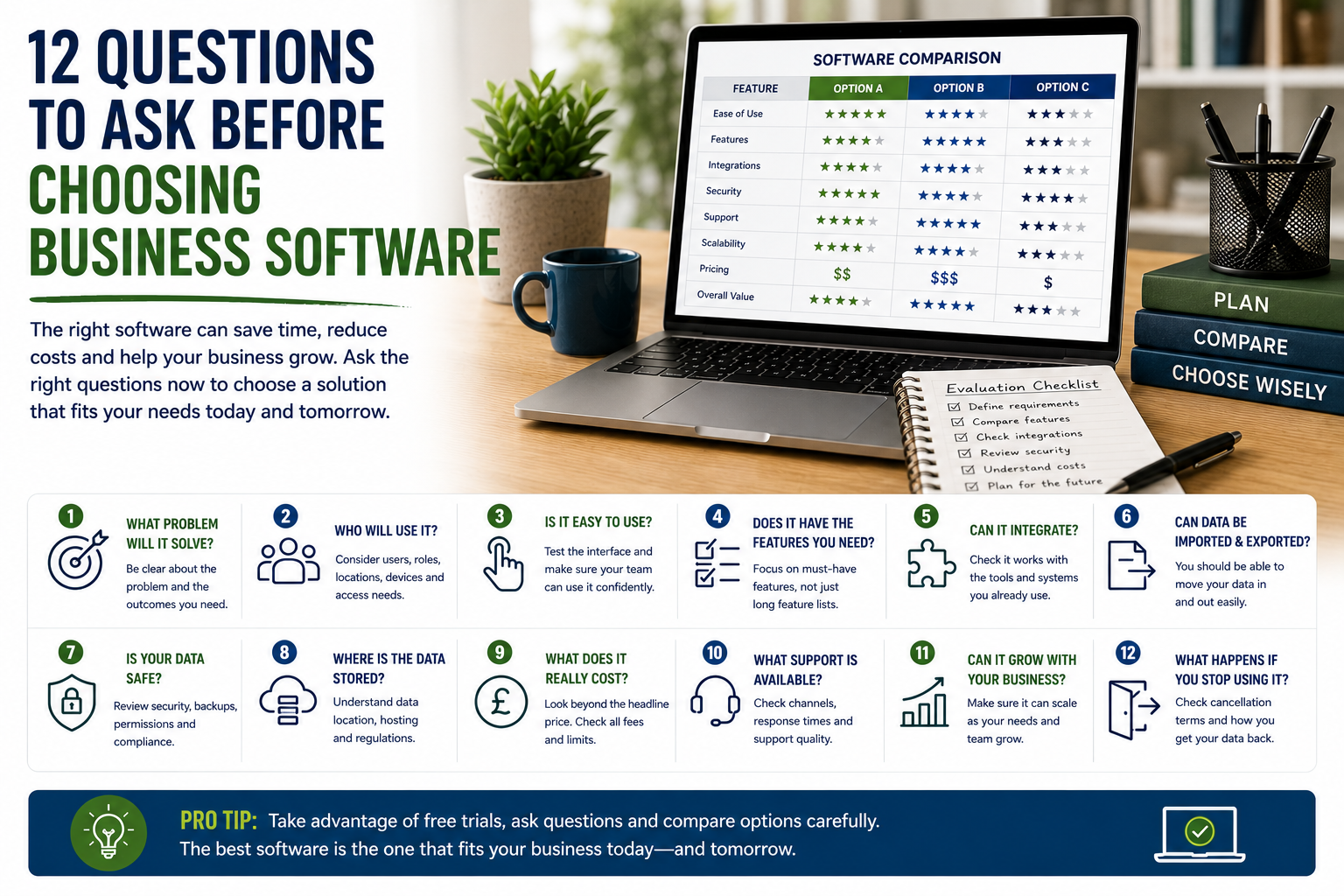
12 Questions to Ask Before Choosing Business Software
Business software can save time, organise information and make routine work easier to manage.
However, the wrong platform can create additional costs, duplicate tasks, confuse staff and lock important data into a system that no longer suits the business.
A polished website, long feature list or introductory discount does not necessarily mean that a tool is the right choice. Before subscribing, businesses should consider how the software will be used, who will manage it and whether it can support future needs.
Here are twelve important questions to ask before choosing business software.
1. What Problem Will the Software Solve?
Start with the business problem rather than the product.
A company may be looking for software because it needs to:
- Manage customer enquiries
- Track projects
- Organise appointments
- Send invoices
- Store documents
- Schedule social media
- Automate repetitive work
- Improve reporting
- Coordinate a team
- Replace spreadsheets
The problem should be specific.
For example, “we need better organisation” is too broad. A clearer problem might be:
Customer enquiries are stored across several inboxes, and follow-ups are sometimes missed.
This makes it easier to decide whether customer relationship management software is actually required.
Without a clearly defined problem, businesses may purchase tools that look impressive but provide little practical benefit.
2. Who Will Use It?
The needs of the people using the software should influence the decision.
Consider:
- Number of users
- Roles
- Technical confidence
- Working locations
- Devices
- Access requirements
- Training needs
Software used by one experienced administrator may be unsuitable for a wider team with different levels of technical ability.
Ask whether the platform provides:
- Different user roles
- Permission controls
- Shared access
- Mobile apps
- Guest accounts
- Client access
- Administrator controls
The system should be easy enough for the intended users to adopt consistently.
3. Is It Easy to Use?
A feature-rich platform may still be a poor choice if staff find it difficult to use.
During a trial, test common tasks such as:
- Creating a record
- Finding information
- Assigning work
- Uploading files
- Generating a report
- Changing settings
- Adding a user
- Exporting data
The interface should feel logical.
Businesses should be cautious about selecting software based only on a guided demonstration. A sales representative may make a complex system appear easier than it will be during normal use.
Ask several intended users to test it where possible.
4. Does It Include the Features You Actually Need?
Software providers often promote extensive feature lists.
However, more features do not automatically create more value.
Create two lists:
Essential features
These are required for the software to solve the main problem.
Useful features
These would be helpful but are not necessary.
For example, a small project-management system may need:
- Tasks
- Deadlines
- Assignments
- Comments
- File attachments
Advanced resource planning, financial forecasting or complex automations may not be necessary.
Focusing on essential features reduces the risk of paying for unnecessary complexity.
5. Can It Integrate With Existing Tools?
Business software rarely operates in isolation.
It may need to connect with:
- Accounting software
- Website forms
- Calendars
- Payment processors
- Cloud storage
- Customer databases
- Analytics
- Marketing platforms
- Automation tools
Check whether integrations are:
- Built in
- Available through an extension
- Possible through an automation platform
- Restricted to higher plans
- Dependent on custom development
An integration should also be tested.
The presence of a logo on an integrations page does not always mean that every required function is supported.
6. Can Data Be Imported and Exported?
Businesses should retain practical access to their information.
Before subscribing, check whether the platform allows data to be imported from existing systems.
Also confirm whether data can be exported in a usable format.
This may include:
- Customer records
- Project data
- Invoices
- Files
- Reports
- Messages
- Product information
- Appointment records
Ask:
- Which formats are supported?
- Is export available on all plans?
- Are attachments included?
- Can full backups be downloaded?
- Is professional migration support available?
A platform should not make it unnecessarily difficult to leave.
7. How Is Information Protected?
Business software may store sensitive information.
This can include:
- Customer details
- Financial records
- Employee information
- Contracts
- Health information
- Internal documents
- Passwords
- Project data
Review the provider’s approach to:
- Encryption
- Backups
- Access controls
- Multi-factor authentication
- Security monitoring
- Data recovery
- Incident response
- Staff access
Businesses operating in regulated sectors may need additional protections.
Security claims should be specific enough to understand rather than relying only on general statements such as “bank-level security.”
8. Where Is the Data Stored?
Data location can matter for privacy, regulation and contractual requirements.
Ask:
- In which country is data stored?
- Is it transferred internationally?
- Which hosting provider is used?
- Can a regional data centre be selected?
- Are backups stored in the same region?
- Which subcontractors process the data?
Businesses should review whether the arrangement fits applicable legal and contractual requirements.
The provider’s privacy policy and data-processing terms should be available before purchase.
9. What Does It Really Cost?
The headline price may not represent the full cost.
Additional charges may apply for:
- Extra users
- Storage
- Premium integrations
- Automation
- Reporting
- Support
- Data migration
- Training
- Mobile access
- API usage
- Transaction fees
- Annual renewal
Calculate the likely cost based on actual usage.
For example, a platform advertised at £15 per month may cost considerably more once several users and essential integrations are added.
Also check:
- Monthly versus annual billing
- Introductory discounts
- Renewal prices
- Minimum contracts
- Currency conversion
- VAT or tax
The most affordable option is the one that provides the required value at a sustainable total cost.
10. What Support Is Available?
Support becomes important when the software affects customers, payments or daily operations.
Compare:
- Email support
- Live chat
- Telephone support
- Support hours
- Response times
- Priority support
- Onboarding
- Training
- Documentation
- Community forums
Check whether support is available on the intended plan.
Some providers advertise support broadly but reserve faster assistance for premium customers.
It can also be useful to test support during the trial period.
Ask a genuine question and assess the quality of the answer.
11. Can It Grow With the Business?
A platform should support realistic future needs without forcing the business into unnecessary complexity now.
Consider whether it can accommodate:
- More users
- More customers
- Additional locations
- Larger file volumes
- New services
- Advanced reporting
- More automation
- International operations
- Different currencies
- Additional departments
Scalability does not mean choosing the largest system available.
It means avoiding a platform that is likely to become unsuitable after modest growth.
Check how pricing changes as usage increases.
12. What Happens If the Business Stops Using It?
Exit planning is often overlooked.
Before subscribing, ask:
- How can the account be cancelled?
- Is there a notice period?
- How long is data retained?
- Can data be exported after cancellation?
- Are files deleted immediately?
- Can the account be temporarily suspended?
- Are there termination fees?
- Can the subscription be downgraded?
The business should also know how to transfer ownership if the person who created the account leaves.
Important software should be registered using company-controlled contact details.
Use the Free Trial Properly
A free trial should be used to test real workflows rather than simply browse the interface.
Create a small test project and try to:
- Add users
- Import data
- Create tasks
- Connect an integration
- Generate a report
- Export information
- Contact support
- Test mobile access
This provides a more realistic understanding of the platform.
Avoid entering sensitive or live customer information unless the trial environment has been approved for that purpose.
Ask Staff for Feedback
The person purchasing the software may not be the person using it most often.
Ask intended users:
- Is it easy to understand?
- Does it reduce work?
- Are important features missing?
- Is information easy to find?
- Does it create additional steps?
- Would training be required?
Staff resistance is not always a reason to reject a system, but usability concerns should be taken seriously.
A platform that is never used consistently will not deliver value.
Consider Implementation Time
New software requires more than payment and login details.
Implementation may involve:
- Data cleaning
- Migration
- Configuration
- User permissions
- Integrations
- Training
- Testing
- Documentation
- Process changes
Ask who will manage implementation and how much time it will require.
A low-cost platform may still be expensive if setup takes many staff hours.
Review the Provider’s Reputation
Research the software company as well as the product.
Look for information about:
- Reliability
- Support
- Billing
- Security
- Product updates
- Service outages
- Customer complaints
- Data export
- Account cancellation
Independent reviews can be useful, but they should be interpreted carefully.
A large platform may have more negative reviews simply because it has more customers. Look for recurring patterns rather than isolated complaints.
Check How Often the Software Is Updated
Regular updates can indicate active development.
However, frequent change can also disrupt users.
Review:
- Product announcements
- Release notes
- Status pages
- Roadmaps
- Support documentation
- Recent feature improvements
Be cautious if the software appears abandoned or if important issues remain unresolved for long periods.
Also consider whether new features are included in the existing price or moved into more expensive plans.
Look for Reliable Uptime
Software used for bookings, sales or customer service should be reliably available.
Check whether the provider publishes:
- Uptime information
- Incident history
- Maintenance notices
- System status
- Recovery procedures
No online system can guarantee permanent availability.
The key question is how often disruptions occur and how transparently they are handled.
Avoid Buying Based on Artificial Intelligence Alone
Many software providers now promote AI features.
These may support:
- Drafting
- Summaries
- Automation
- Data categorisation
- Customer replies
- Reporting
These features can be useful, but they should not distract from the core product.
Ask:
- Is the AI feature genuinely useful?
- Does it process confidential data?
- Can output be reviewed?
- Is usage limited?
- Does it cost extra?
- Can it be disabled?
- How accurate is it?
A strong platform should remain useful even without fashionable features.
Watch for Vendor Lock-In
Vendor lock-in occurs when leaving a platform becomes unusually difficult or expensive.
Warning signs include:
- Proprietary file formats
- Limited exports
- Restricted API access
- Long cancellation periods
- Exclusive control by a supplier
- Expensive migration
- Loss of access immediately after cancellation
Some level of switching difficulty is unavoidable.
However, the business should understand the risk before committing.
Create a Software Comparison Table
A simple table can make different options easier to compare.
| Factor | Platform A | Platform B | Platform C |
|---|---|---|---|
| Solves main problem | |||
| Ease of use | |||
| Essential features | |||
| Integrations | |||
| Data export | |||
| Security | |||
| Support | |||
| Monthly cost | |||
| Annual cost | |||
| Scalability | |||
| Contract terms | |||
| Overall suitability |
The final decision should reflect suitability rather than the longest feature list.
Warning Signs
Potential warning signs include:
- Unclear pricing
- No data-export option
- Poor support reviews
- Long contracts without justification
- Weak security information
- Hidden renewal increases
- Difficult cancellation
- Frequent outages
- Unclear ownership
- Aggressive sales pressure
Several warning signs should encourage the business to consider alternatives.
Final Thoughts
Choosing business software should begin with a clearly defined problem.
The right platform should be usable, secure, reasonably priced and compatible with the systems the business already uses.
Features, integrations, support, data ownership, scalability and exit terms should all be reviewed before subscribing.
A careful selection process can prevent wasted spending and unnecessary disruption.
The best software is not the platform with the most features. It is the one that solves the right problem and becomes a reliable part of the business’s everyday work.