How Artificial Intelligence Is Changing Everyday Business Tasks
Artificial intelligence is becoming part of many everyday business tools.
It can help organise information, draft content, summarise documents, analyse data, automate repetitive work and support customer service. For small businesses, this can reduce administrative pressure and make certain tasks faster.
However, artificial intelligence is not a replacement for judgement, expertise or human responsibility. Its output can be incomplete, inaccurate or unsuitable, especially when the task involves sensitive information, regulated advice or important business decisions.
The most practical approach is to use AI as a supporting tool rather than allowing it to operate without review.
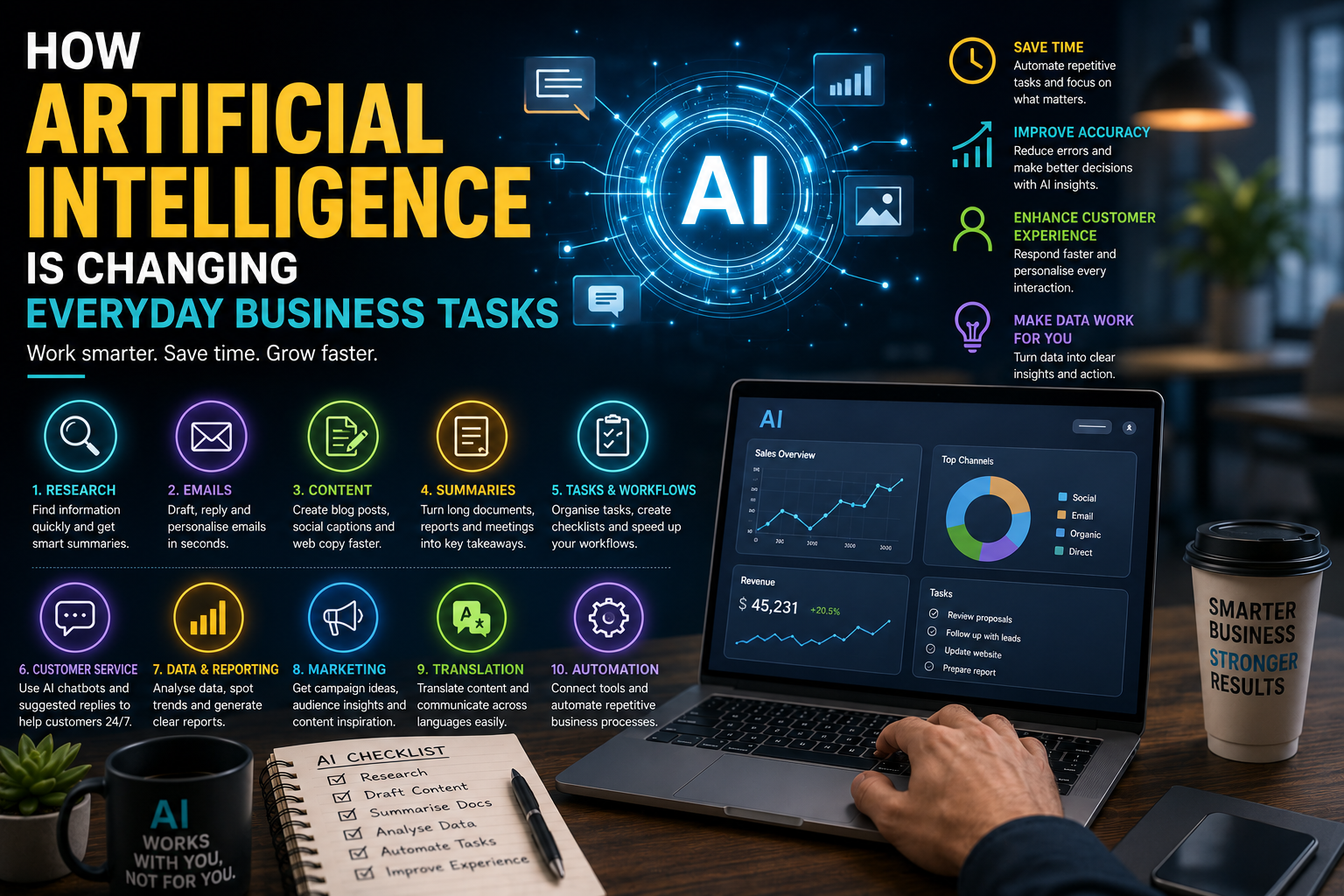
Here are some of the main ways artificial intelligence is changing routine business work.
1. Research and Information Gathering
Research is one of the most common business uses of artificial intelligence.
AI tools can help users:
- Summarise broad topics
- Identify common themes
- Compare ideas
- Organise research notes
- Suggest questions to investigate
- Explain unfamiliar terminology
- Create initial topic outlines
- Extract key points from supplied documents
This can be useful when preparing:
- Marketing plans
- Client proposals
- Competitor reviews
- Product research
- Training materials
- Content briefs
- Meeting preparation
- Internal reports
However, AI-generated research should not be treated automatically as factual.
The information may be outdated, incomplete or based on unreliable sources. Important claims should be checked against original and authoritative material.
AI can accelerate the first stage of research, but verification remains essential.
2. Drafting Emails and Business Communications
Artificial intelligence can help draft routine communications.
This may include:
- Client follow-ups
- Appointment reminders
- Proposal introductions
- Internal updates
- Customer-service replies
- Meeting confirmations
- Thank-you messages
- Payment reminders
It can also adjust the tone of an existing message to make it:
- More professional
- More concise
- More approachable
- More direct
- Easier to understand
This can save time, particularly for people who spend a large part of the day responding to similar enquiries.
However, messages should still be reviewed before they are sent.
AI may misunderstand the context, use language that feels impersonal or introduce details that were never provided.
Sensitive, emotional or high-value communications should receive careful human attention.
3. Creating First Drafts of Content
AI tools can assist with the first draft of:
- Blog posts
- Social media captions
- Website copy
- Product descriptions
- Frequently asked questions
- Email newsletters
- Video scripts
- Press-release outlines
This can help overcome the difficulty of starting from a blank page.
A business can provide information about:
- Its audience
- Its services
- Its tone of voice
- Important points
- Desired length
- Publishing format
The AI can then structure that information into an initial draft.
The strongest results usually come when the business provides clear, specific source material.
Generic prompts often produce generic content.
All drafts should be edited for:
- Accuracy
- Originality
- Brand voice
- Relevance
- Legal or regulatory compliance
- Unsupported claims
- Repetition
- Readability
AI can support content production, but it should not replace subject-matter knowledge or editorial responsibility.
4. Summarising Documents and Meetings
Businesses often deal with lengthy information.
Artificial intelligence can help summarise:
- Meeting transcripts
- Research documents
- Reports
- Client notes
- Policies
- Proposals
- Support conversations
- Project updates
A useful summary might identify:
- Main decisions
- Outstanding questions
- Responsibilities
- Deadlines
- Risks
- Follow-up actions
This can reduce the time spent reviewing long documents.
However, summaries may omit nuance or misinterpret an important detail.
For contracts, medical information, legal matters, financial reports or formal policies, the original document should remain the primary source.
AI summaries should be treated as a navigation aid, not a substitute for reviewing important material.
5. Organising Tasks and Workflows
AI can help turn unstructured information into practical tasks.
For example, it may convert meeting notes into:
- Action items
- Deadlines
- Task descriptions
- Project stages
- Follow-up reminders
- Responsibility lists
It can also help businesses develop:
- Standard operating procedures
- Client-onboarding checklists
- Content calendars
- Project templates
- Quality-control checklists
- Monthly work plans
This can be particularly useful for small teams where important processes may currently exist only in someone’s memory.
Before relying on an AI-generated workflow, the business should check that:
- No essential step is missing
- Responsibilities are realistic
- Dependencies are correct
- Deadlines are achievable
- Compliance requirements are included
A well-structured workflow can improve consistency, but it still needs to reflect how the business actually operates.
6. Customer Service Support
Artificial intelligence can support routine customer-service tasks.
It may help:
- Categorise enquiries
- Suggest replies
- Answer common questions
- Route messages
- Summarise previous conversations
- Identify urgent issues
- Provide information outside business hours
Chatbots and automated assistants may be useful for simple questions such as:
- Opening hours
- Delivery information
- Appointment availability
- Service areas
- Return policies
- Basic pricing
- Contact details
However, customers should be able to reach a person when necessary.
AI should not be used to avoid responsibility or create the impression that a customer is speaking with a human when they are not.
Businesses should also be cautious when the enquiry involves:
- Complaints
- Refunds
- Health concerns
- Legal disputes
- Financial difficulty
- Safeguarding
- Personal or sensitive information
These situations require human judgement and empathy.
7. Data Analysis and Reporting
AI can help explain patterns within business data.
It may assist with:
- Summarising performance
- Identifying trends
- Comparing periods
- Highlighting unusual changes
- Grouping customer feedback
- Suggesting possible causes
- Preparing report commentary
Examples include reviewing:
- Website traffic
- Sales performance
- Marketing campaigns
- Customer enquiries
- Support tickets
- Product returns
- Survey responses
This can make data easier to understand for people who do not work with analytics every day.
However, AI should not be trusted blindly to interpret figures.
The underlying data may be incomplete, incorrectly configured or based on inconsistent definitions.
Before acting on an AI-generated conclusion, check:
- Where the data came from
- Whether the time periods are comparable
- Whether tracking is accurate
- Whether important context is missing
- Whether the conclusion is supported by the figures
Artificial intelligence can help explain data, but it cannot automatically correct poor measurement.
8. Marketing Planning
AI tools can help businesses explore marketing ideas.
They may assist with:
- Audience questions
- Campaign concepts
- Content themes
- Editorial calendars
- Headline ideas
- Social media topics
- Promotional angles
- Customer-journey mapping
This can be useful during brainstorming.
A business may ask an AI tool to generate ideas for:
- Seasonal campaigns
- Local content
- Educational posts
- Email sequences
- Lead magnets
- Customer-retention campaigns
The results should be treated as suggestions rather than strategy.
A useful marketing plan still requires knowledge of:
- The business
- Its customers
- Its competitors
- Its budget
- Its goals
- Its sales process
- Its brand
- Its market position
AI can produce many ideas quickly, but quantity does not guarantee quality.
9. Image and Design Support
Artificial intelligence is increasingly used to support visual content.
It can assist with:
- Image generation
- Background removal
- Image resizing
- Layout suggestions
- Presentation design
- Colour adjustments
- Basic photo editing
- Social-media graphics
This can help small businesses create visual assets more efficiently.
However, generated images can contain:
- Incorrect text
- Unrealistic details
- Inconsistent branding
- Distorted objects
- Misleading representations
- Unclear licensing implications
Businesses should avoid using generated imagery in a way that deceives customers.
For example, an AI-generated project image should not be presented as real completed work.
Generated visuals should be reviewed carefully and used transparently where context requires it.
10. Translation and Language Support
AI can help translate and adapt routine content.
This may include:
- Customer messages
- Website sections
- Product information
- Internal documents
- Social posts
- Simple instructions
It can also help improve clarity for people writing in a second language.
However, automatic translation may misunderstand:
- Cultural context
- Technical terms
- Legal language
- Humour
- Local expressions
- Industry-specific wording
Important public-facing or regulated content should be reviewed by a fluent speaker or professional translator.
AI translation is most useful as a starting point rather than a final guarantee of accuracy.
11. Recruitment and Human Resources Administration
AI can help organise some recruitment tasks.
It may assist with:
- Drafting job descriptions
- Structuring interview questions
- Summarising applications
- Preparing onboarding checklists
- Writing internal policies
- Creating training outlines
However, recruitment decisions should not be delegated entirely to automated systems.
Poorly designed tools may reproduce bias, overlook relevant experience or make decisions that cannot be explained clearly.
Human review is necessary when assessing candidates, performance or employment-related matters.
Businesses should also be careful about how applicant and employee data is processed.
12. Financial Administration
AI-enabled tools may support routine financial administration.
Examples include:
- Categorising expenses
- Extracting invoice information
- Identifying missing payments
- Summarising cash flow
- Drafting payment reminders
- Detecting unusual transactions
These features can help reduce manual work.
However, AI output should not replace a qualified accountant or financial professional where advice is required.
Businesses should check all important figures and retain proper records.
Financial decisions based on incorrect automated analysis can have serious consequences.
13. Automation Between Business Tools
Artificial intelligence can work alongside automation software to connect different systems.
For example, a workflow may:
- Receive a website enquiry
- Categorise the request
- Add it to a CRM
- Draft an acknowledgement
- Create a follow-up task
- Notify the appropriate team member
This can reduce repetitive administration.
However, automated workflows require careful setup.
A mistake could:
- Send the wrong message
- Assign a lead incorrectly
- Duplicate records
- Expose sensitive information
- Trigger an action at the wrong time
Businesses should begin with low-risk automations and maintain human oversight.
The Importance of Human Review
Artificial intelligence can produce confident answers even when it is wrong.
Common problems include:
- Invented facts
- Incorrect figures
- Outdated information
- Misunderstood instructions
- Unsupported claims
- Missing context
- Repetitive writing
- Inappropriate tone
Human review is especially important when the output affects:
- Customers
- Finances
- Contracts
- Health
- Employment
- Reputation
- Legal obligations
- Public claims
The person reviewing the output should understand the subject well enough to identify errors.
Privacy and Confidentiality
Businesses should be cautious about entering sensitive information into AI tools.
This may include:
- Customer records
- Health information
- Financial information
- Passwords
- Contracts
- Employee data
- Confidential business plans
- Unpublished intellectual property
Before using a tool, check:
- How information is stored
- Whether it is used for training
- Who can access it
- Whether data can be deleted
- Where it is processed
- What contractual protections apply
- Whether the tool is suitable for regulated information
Staff should receive clear guidance about what they may and may not enter into AI systems.
Copyright and Originality
AI-generated content may raise questions about originality, ownership and source material.
Businesses should avoid assuming that generated content is automatically safe to publish.
Review:
- Whether the output closely resembles existing material
- Whether images include protected logos or characters
- Whether the content uses unattributed quotations
- Whether third-party rights may be affected
- Whether platform terms permit the intended use
Generated content should be treated as material requiring editorial review.
Choosing Appropriate AI Tools
Before adopting an AI tool, consider:
- What problem it solves
- How often it will be used
- Whether staff understand it
- What data it processes
- Whether output can be checked
- How it integrates with existing systems
- What the total cost is
- Whether access can be controlled
- What happens if the tool is discontinued
Businesses should avoid subscribing to multiple tools that perform the same function.
A small number of well-chosen tools is usually easier to manage.
Start with Low-Risk Tasks
The safest way to introduce artificial intelligence is to begin with tasks where errors are easy to identify and correct.
Suitable starting points may include:
- Brainstorming
- Drafting internal outlines
- Rewriting non-sensitive text
- Summarising supplied notes
- Creating checklists
- Organising ideas
- Suggesting questions
Higher-risk tasks should receive stronger controls.
These include:
- Providing professional advice
- Making financial decisions
- Screening job applicants
- Handling medical information
- Sending automatic complaint responses
- Publishing factual claims without review
The level of oversight should match the potential consequences of an error.
Create an Internal AI Policy
Even a small business can benefit from a simple written policy.
The policy may explain:
- Which tools are approved
- What information may be entered
- Which tasks require human review
- Who is responsible for published output
- How generated content should be disclosed
- How errors should be reported
- How customer data is protected
This helps staff use AI more consistently and reduces unnecessary risk.
Final Thoughts
Artificial intelligence is changing everyday business tasks by making it easier to organise information, create first drafts, summarise documents, analyse data and automate routine work.
Its greatest value is often not replacing people, but helping them complete repetitive or time-consuming tasks more efficiently.
Businesses should adopt AI carefully, beginning with clear use cases and low-risk activities.
Every important output should be reviewed, sensitive information should be protected and responsibility should remain with the people using the technology.
Used thoughtfully, artificial intelligence can become a practical business tool. Used carelessly, it can create errors, privacy risks and misleading results.